SuperLearner
The superLearner proc considers a collection of candidate models (so called base learners) and systematically chooses the best combination of them. This proc is applicable for training and scoring predictive models for continuous and binary response variables.
You can find more about this proc in the SAS Documentation.
The superLearner enables us to train (and score) the super learner models by specifying the base learner models, utilize cross-validation and even utilize meta-learning methods.
Getting Started
We are going to be starting things of with a minimal example and then build it up from there as we go along. As our dataset we will be working with the HMEQ dataset with the target variable being Bad and the rest are input variables.
Step 1: Data & Minimal Proc
Here is the code to load the HMEQ dataset into the work library - all the subsequent code will assume that the data is available there.
* Getting the HMEQ dataset;
data work.hmeq;
    set sampsio.hmeq;
run;
Now let us first look at the minimal version of proc superLearner, then we will go through each line and discuss the results. The order of statements choosen can be changed and was only chosen in order to provide as much clarity as possible.
proc superLearner data = work.hmeq;
    target bad / level = nominal;
    input loan;
    baseLearner 'Decision_Tree' treeSplit;
    baseLearner 'Logistic_Regression_Model' logSelect;
quit;
- In the proc superLearner statement we only have to provide one option and that is our input dataset. Our value here is work.hmeq.
- In order to be able to train a predictive model we have to specify our target variable using the target statement. We can only specify one target variable. The proc tries to determine the target level using the variable type: numeric defaults to interval and character defaults to nominal. By specifing the statement options after slash (/) we can overwrite this (note that interval variables can only be numeric). Our value here is bad and then we have to specify that the level option and set it to nominal, since it only contains 0 and 1.
- In addition to a target we also need the inputs that should be considered for training the model. We need to provide at least input variable. The level of the variable is determined in the same way as the target. There can be multiple input statements - I'm going to suggest to have a maxium of two where we split the nominal and interval inputs. Our value here is loan, since it is a numeric variable it will be treated as an interval which is exactly what we want.
- Now we are getting into the base learners that represents the list of the different models that are assesst by the super learner model. We need to specify at least two baseLearner statements in order for the proc to run. The baseLearner statement starts with a quoted label - the value of this label should be a valid SAS variable name, as the label is used in an output table - and is followed by the algorithm used to train this base learner. We can add additional options as well, but here we are just running with the defaults. Our value here is for the label 'Decision_Tree' and the algorithm used is treeSplit.
- Our value here is for the label 'Logistic_Regression_Model' and the algorithm used is logSelect.
And now let us look at the results - please note since we didn't provide a seed value the results might look sighlty different for you:
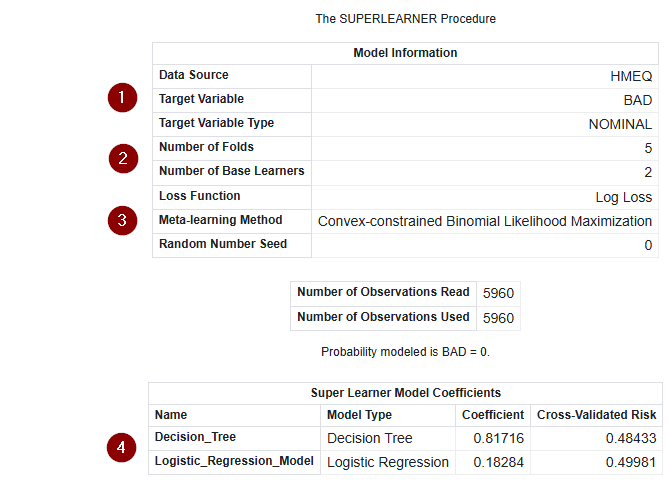
The output consists of three tables - the list below is in order and does not correspond to the numbers in the screenshot:
- Model Information, which summaries the overall information about the super learner model.
- Number of Observations, contains information about the number of obersvations that were read and used during training.
- Super Learner Model Coefficients, contains the information about the coefficients for each of the base learners.
Now we are going to talk about the numbers in the screenshot
- Here we see on a quick glance the data source that was used, the target variable and its level.
- The number of folds specifies how many partition folds for the cross validation where used and how many base learners where used.
- The log loss function depends on the target variable (log loss if it is binary and for continuous once squared loss is used). The meta-learning method documents which method was used here more of this in a later step. And finally the seed, if the value is below one, than the systems timestamp is used.
- Here we see the coefficient of each base learner in one place.
Step 2: More Inputs & Base Learners
In this we will do two things:
- We are going to learn about all the different base learners available to us.
- We are going to expand the input variables and the run our code.
So first up let's talk about the different base learners that are available to us utilizing this table:
| Group | Name | Description | Link |
|---|---|---|---|
| Statistics | BART | Bayesian additive regression trees model | Option Link |
| Machine Learning | BNET | Bayesian network model | Option Link |
| Machine Learning | FACTMAC | Factorization machine model | Option Link |
| Machine Learning | FOREST | Forest model | Option Link |
| Statistics | GAMMOD | Generalized additive model based on low-rank regression splines | Option Link |
| Statistics | GAMSELECT | Generalized additive model with model selection | Option Link |
| Machine Learning | GPCLASS | Gaussian process classification model | Option Link |
| Machine Learning | GPREG | Gaussian process regression model | Option Link |
| Machine Learning | GRADBOOST | Gradient boosting model | Option Link |
| Machine Learning | LIGHTGRADBOOST | Light gradient boosting machine model | Option Link |
| Statistics | LOGSELECT | Logistic regression model with model selection | Option Link |
| Machine Learning | NNET | Artificial neural network model | Option Link |
| Statistics | REGSELECT | Ordinary least squares regression model with model selection | Option Link |
| Machine Learning | SVMACHINE | Support vector machine model | Option Link |
| Statistics | TREESPLIT | Tree-based statistical model | Option Link |
Each of these base learners has their own set of options that are used to tune the model. If you are familiar with the corresponding procs (each base learner has as proc with the same name) than you will note that not all of the options are available here. In order to extend our code we will be adding Light Gradient Boosting and Neural Network base learner to our code example.
Now we are going to switch gears to add some additional inputs to our superLearner. We are going to be adding the reason and job which are character and thus will be classified as nominal inputs, but we will make that explicit in the code just so we get a feeling for it. And then we will also be adding the derog, debtinc and delinq which are all numeric and also interval inputs. Just as an exercise we will also declare derog as nominal. We are going to be doing this by creating two input statements one where we specify the level to be nominal and one where it is set to interval. Setting the interval isn't strictly necessary but I think it is a good practise to increase readability.
proc superLearner data = work.hmeq;
    target bad / level = nominal;
    input loan debtinc delinq / level = interval;
    input job reason derog / level = nominal;
    baseLearner 'Decision_Tree' treeSplit;
    baseLearner 'Logistic_Regression_Model' logSelect;
    baseLearner 'Light_Gradient_Boosting' lightGradBoost;
    baseLearner 'Neural_Network' nNet;
quit;
Please note this code will create warnings in the log, while we can safely ignore this I want to note that this is primarily caused by our classification of derog as a nominal input as it contains missing values.
Step 3: Options for the Base Learners
We are now going to reduce the amount of base learners again back down to our original two and just change one option for each of them. This is just so we get a feeling for how this is done, if you are interested in diving deeper into the details than utilize the table above and follow the option links to dive into the specific details of all base learner options. The model options follow the model and are enclosed in parenthesis.
First up is our treeSplit base learner which has four total options (criterion, degree, minLeafSize and numBin) + the input options which we are going to touch in a moment. So below we are just going to look at the base learner statement. The two options we are going to look at are the criterion (i.e. when to split a parent node into a child node) and numBin (i.e. how many bins are used for interval inputs).
    * This is the version that contains the default values assigned by proc superLearner;
    baseLearner 'Decision_Tree' treeSplit (criterion = IGR numBin = 50);
    * Here is our changed version;
    baseLearner 'Decision_Tree' treeSplit (criterion = GINI numBin = 10);
And now we are taking a look at the logSelect base learner which has seven total options (lassoRho, lassoSteps, lassoTol, link, partByFrac, partByVar and selection) + the input options. We are again only be changing two options this time the
    * This is the version that contains the default values assigned by proc superLearner;
    baseLearner 'Logistic_Regression_Model' logSelect (link = logit selection = none);
    * Here is our changed version;
    baseLearner 'Logistic_Regression_Model' logSelect (link = probit selection = elasticNet);
Finally let us talk about the input options mentioned above. After the model options we can also specify the input option which enable us to change, add or remove variables for a certain base learner. There are two available and that is intInput (for interval) and nomInput (for nominal). Note that there are base learners that call these class and effect instead (e.g. logSelect) and some base learners only support interval inputs so correspondingly they only support the intInput option. The list of variables need to be enclosed in parantheses. We are going to remove one of the inputs for our treeSplit base learner.
Here is our updated code:
proc superLearner data = work.hmeq;
    target bad / level = nominal;
    input loan debtinc delinq / level = interval;
    input job reason / level = nominal;
    baseLearner 'Decision_Tree' treeSplit (criterion = GINI numBin = 10) intInput = (loan debtinc);
    baseLearner 'Logistic_Regression_Model' logSelect (link = probit selection = elasticNet);
quit;
Step 4: Crossvalidation, Margins and Proc Options
Now are going to touch on even more customization options but without going into the details of that.
The crossValidation statement enables us to change the number of partition folds in the cross validation (minimum of two) and it enables us to use categorical variable to do stratified cross-validation. To learn more check out the SAS Documentation.
The margin statement enables us to obtain a predictive margin by fixing one or more values of inputs. To learn more check out the SAS Documentation. The label provided should be a valid SAS variable name.
Proc superLearner itself also has some additional options, besides data:
- method, enables us to change the meta-learning method.
- seed, enables us to set the start for the pseudorandom number generator for k-fold partioning and base learner model building.
- applyWordOrder, enables us to simulate latent variables - this is only available for tables that are stored in CAS.
- reStore, enables us to load a previously trained superLearner to score new data. More about this in the next section.
For more information on the proc options check out the SAS Documentation.
Step 5: Outputs, Storing and Scoring
The output statement enables us to save the predicted values from the fitted model. In addition we can also retrieve the predicted response for each trained base learner and if the margin statement was used we can get the results for each secanrio. By default only the predicted values are stored in the output table so that the option copyVars is available to specify the columns that you want to store along with the output. If you have a key column (or multiples) it is a good idea to only copy those in order to reduce data movement (e.g. copyVars = (id inquiry_date)), if that is not the case you can also use this shortcut to copy all of the variables - for more information check out the SAS Documentation:
proc superLearner data = work.hmeq;
    target bad / level = nominal;
    input loan;
    baseLearner 'Decision_Tree' treeSplit;
    baseLearner 'Logistic_Regression_Model' logSelect;
    output out = work.hmeq_scored copyVars = (_all_);
quit;
The store statement enables us to store the trained super learner model as a binary astore (analytical store) file that can be used to score new data. Below we are going to augment our training code and the below we will have our scoring code. In order for this to work we need to provide a path on the SAS Server where this data is stored across SAS session - for more information check out the SAS Documentation:
/* Start training code */
* Specify the full path on the SAS Server;
%let basePath = /path/to/a/folder;

data work.hmeq;
    set sampsio.hmeq;
run;

libname super "&basePath.";
filename modelStr "&basePath./superLearner.sasast";

proc superLearner data = work.hmeq;
    target bad / level = nominal;
    input loan debtinc delinq / level = interval;
    input job reason / level = nominal;
    baseLearner 'Decision_Tree' treeSplit (criterion = GINI numBin = 10) intInput = (loan debtinc);
    baseLearner 'Logistic_Regression_Model' logSelect (link = probit selection = elasticNet);
    output out = work.results copyvars=(_all_);
    store out = super.superLearnerModel;
quit;

* Download the analytica store file to the library;
proc aStore;
   download rStore = super.superLearnerModel store = modelStr;
quit;

/* End of training code */
Now we have to reset our SAS session to pretend that time has passed and we are coming back to it to score data:
/* Start of score code */
* Specify the full path on the SAS Server;
%let basePath = /path/to/a/folder;

data work.hmeq;
    set sampsio.hmeq;
run;

libname super "&basePath.";
filename modelStr "&basePath./superLearner.sasast";

proc aStore;
    upload store = modelStr rStore = super.superLearnerModel;
quit;


proc superLearner data = work.hmeq reStore = super.superLearnerModel;
    output out = work.hmeq_scored copyVars = (_all_);
quit;

/* End score code */
And with that we conclude our exploration of proc superLearners. There is some additional below to dive even deeper. If you are interested in more of the statistical details of the proc check out the details section in the SAS Documentation.
Additional topics
Getting the Result Tables as SAS Tables
Below you find a ready to use ods output statement that grabs all of the result tables. If you want to learn how this code was generated please check out this Quick Tip.
proc superLearner data = work.hmeq;
    target bad / level = nominal;
    input loan;
    baseLearner 'Decision_Tree' treeSplit;
    baselearner 'Logistic_Regression_Model' logSelect;
    ods output
        ModelInfo = work.ModelInfo
        NObs = work.NObs
        SLCoefficients = work.SLCoefficients
        Margins = work.Margins
        OutputCasTables = work.outputCASTables
        ScoreInfo = work.ScoreInfo;
quit;
Please note the following table about which outputs are available when:
| Name | Requirements |
|---|---|
| ModelInfo | Default output |
| NObs | Default output |
| SLCoefficients | Default output |
| Margins | The margin statement needs to be provided |
| OutputCasTables | The output/store statement needs to be provided |
| ScoreInfo | The option reStore in the proc superlearner statement needs to be provided |
Base Learner Requirements
We did not cover all of the base learners and all of their requirements in the section above. This here serves as an additional point of information providing an overview when a certain base learner can be used and if it has any specific requirements. The assumption here is that you have defined at least one input variable (independant of it being nominal or interval).
| Name | Supported Targets | Input Requirements |
|---|---|---|
| BART | Both | - |
| BNET | Binary | - |
| FACTMAC | Continuous | At least two nominal |
| FOREST | Both | - |
| GAMMOD | Both | - |
| GAMSELECT | Both | - |
| GPCLASS | Binary | Only interval |
| GPREG | Continuous | Only interval |
| GRADBOOST | Both | - |
| LIGHTGRADBOOST | Both | - |
| LOGSELECT | Binary | - |
| NNET | Both | - |
| REGSELECT | Continuous | - |
| SVMACHINE | Both | - |
| TREESPLIT | Both | - |
If we take that into account than we can derive the following maxed out superLearner for our problem (while using a minimal amout of inputs):
proc superLearner data = work.hmeq;
    target bad / level = nominal;
    input loan;
    baseLearner 'Bayesian_Additive_RegTree' bart;
    baseLearner 'Bayesian_Network_Model' bNet;
    baseLearner 'Random_Forest' forest;
    baseLearner 'Generalized_Additve_LowRank' gamMod;
    baseLearner 'Generalized_Additive_Selection' gamSelect;
    baseLearner 'Gaussian_Process_Class' gpClass;
    baseLearner 'Gradient_Boosting' gradBoost;
    baseLearner 'Light_Gradient_Boosting' lightGradBoost;
    baseLearner 'Logistic_Regression_Model' logSelect;
    baseLearner 'Neural_Network' nNet;
    baseLearner 'Support_Vector_Machine' svMachine;
    baseLearner 'Decision_Tree' treeSplit;
quit;
FACTMAC, GPREG and REGSELECT had to be left off as they do not support binary targets and also note how we only used a singular interval input in order to statisfy the constraint of the GPCLASS.